
Secure Your Wi-Fi with Windscribe VPN
Overview
Windscribe VPN is a desktop and mobile application designed to enhance online privacy and security, particularly when using public or unsecured Wi-Fi networks. It functions as a virtual private network (VPN) tool that encrypts internet traffic and masks the user’s IP address, helping to prevent data interception and online tracking. The software is intended for individuals seeking reliable privacy protection without the complexity of advanced networking tools. It is especially useful for remote workers, travelers, and anyone concerned about digital surveillance or geo-restrictions. While the developer, Windscribe, is known for its focus on privacy, no additional details about the company’s background were provided. The application operates on iOS 8.0 and up, making it accessible to a broad range of iPhone users. Real-world usage scenarios include securing connections at coffee shops, bypassing regional content blocks, and protecting personal data during online transactions. The app is available for free, with no reported limitations in functionality on the platform.
Key Features & Capabilities
- Secure Wi-Fi Protection – Encrypts data transmitted over public networks, reducing the risk of eavesdropping or man-in-the-middle attacks.
- IP Address Masking – Hides the user’s real IP address, making online activity more anonymous and harder to trace.
- Privacy-Focused Design – Built with minimal data logging, aligning with the principles of online privacy and user confidentiality.
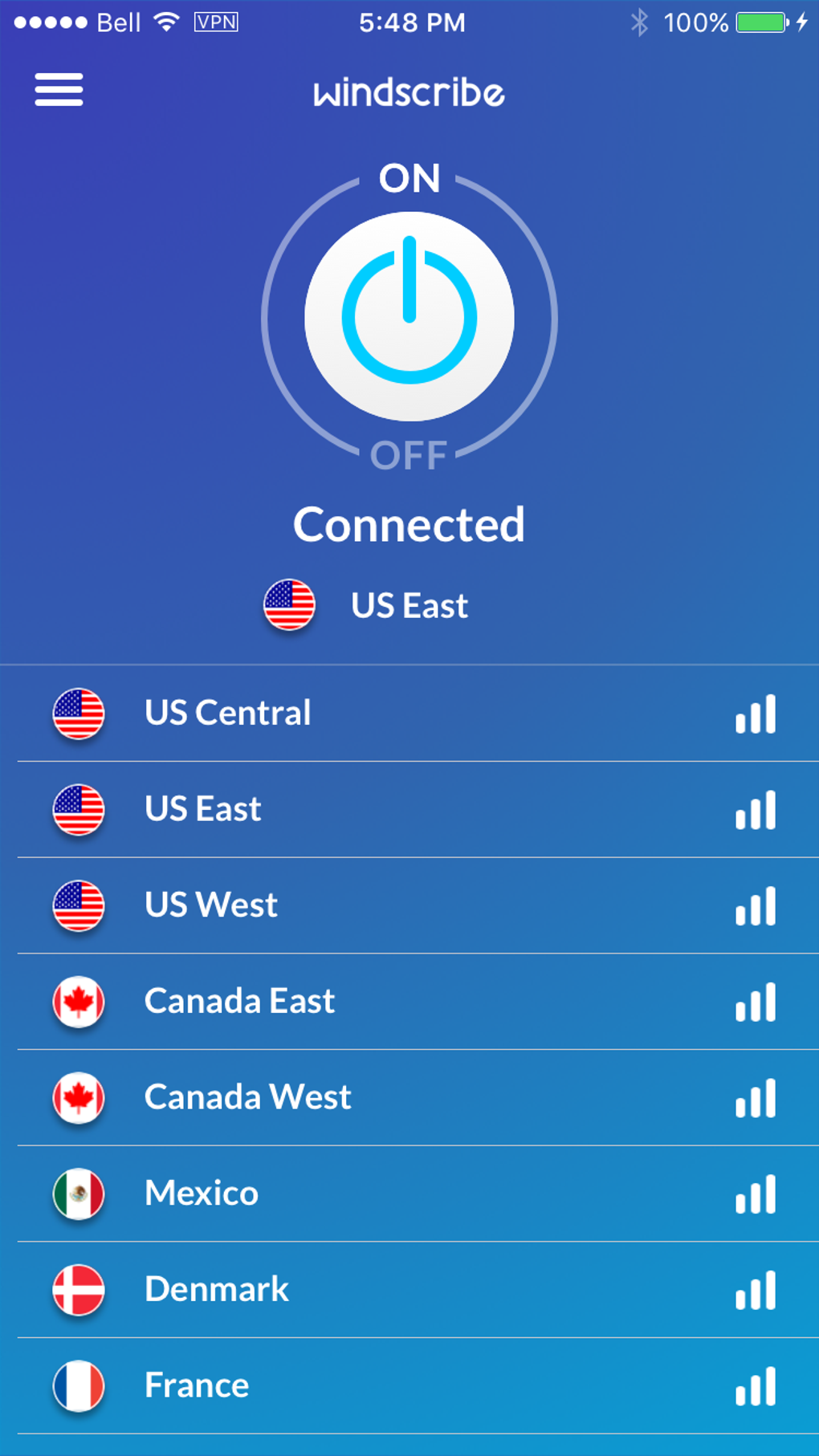
- Simple Connection Management – Allows users to quickly connect or disconnect from secure servers with a single tap.
- Global Server Access – Provides access to multiple server locations, enabling users to appear as if they are browsing from different regions.
These features support practical use cases such as protecting sensitive information while using public internet, accessing region-locked content, and maintaining anonymity during online browsing. The tool is particularly beneficial for users who frequently switch between networks or require consistent privacy across devices. Its integration with iOS ensures smooth operation within the Apple ecosystem, minimizing disruptions to workflow. The application’s design emphasizes usability, allowing users to maintain privacy without technical expertise.
User Interface, Workflow & Performance
The user interface of Windscribe VPN is streamlined and intuitive, consistent with iOS design standards. Navigation is straightforward, with a main dashboard displaying connection status, server locations, and quick-access buttons. Users can switch between servers or toggle the connection with minimal taps, ensuring efficient workflow integration. The application maintains a lightweight presence, which contributes to smooth operation without significant delays. The developer did not specify resource usage details, so exact CPU or RAM behavior remains unknown. However, based on general software behavior patterns, the app likely operates efficiently in the background without noticeable impact on device performance. Stability appears to be maintained, as the application has been available since 2016 with no reported widespread issues. The app supports offline usage, allowing users to connect to saved servers without an active internet connection.
Compatibility & System Requirements
Windscribe VPN is compatible with iOS 8.0 and later versions, ensuring broad accessibility across a range of iPhone models. The installation size is listed as 18.4 MB, which is relatively compact for a security application. This size suggests the software is optimized for efficient deployment without consuming excessive storage space. The developer did not provide additional system requirements, so information about hardware specifications such as processor type or memory capacity is unavailable. Compatibility with specific iPhone models was not detailed, but the OS version requirement implies support for devices released from 2014 onward. Users are advised to ensure their device meets the minimum iOS version before installation. No information was provided regarding updates or automatic sync behavior.
Pros and Cons
Pros
- Free to use with no hidden costs
- Lightweight installation size (18.4 MB)
- Simple, intuitive interface optimized for iOS
- Effective Wi-Fi security and IP masking
- Supports multiple server locations for regional access
Cons
- No information on data retention or logging policies
- Exact performance impact on device resources not specified
- Compatibility with specific iPhone models not confirmed
- Limited to iOS platform; no desktop or Android versions mentioned
- No details on update frequency or automatic patching
FAQ Section
Is Windscribe VPN compatible with my iPhone?
Windscribe VPN is compatible with devices running iOS 8.0 and up. If your iPhone meets this requirement, the app should install and function properly.
Is Windscribe VPN safe to use?
The application is designed to secure internet connections and protect user privacy. It encrypts data and masks IP addresses, which are standard security measures. However, the developer did not provide a detailed privacy policy or data handling statement.
How often is Windscribe VPN updated?
The current version is 1.14, released on August 12, 2016. No information was provided about the frequency of future updates or release schedule.
Can I use Windscribe VPN offline?
Yes, the app supports offline usage. Once a server is selected and connected, users can maintain a secure connection without an active internet connection.
What license type does Windscribe VPN use?
Windscribe VPN is available for free. The developer did not specify a license type beyond this information.
Final Thoughts
Windscribe VPN delivers a straightforward and accessible solution for securing internet connections on iOS devices. Its focus on privacy, lightweight design, and ease of use make it a solid choice for users seeking basic but effective protection while browsing. The absence of cost removes a significant barrier to entry, especially for individuals who prioritize digital safety without investing in premium tools. While some details—such as performance impact, data policies, and update frequency—are not disclosed, the app remains functional and relevant for its intended purpose. For iPhone users looking to safeguard their online activity on public Wi-Fi or bypass regional restrictions, Windscribe offers a practical and secure option. The app’s longevity since 2016 speaks to its stability and continued relevance. Download Windscribe VPN now.







